The problem
A lead misses the call and I never hear from them again. I notice days later, if at all, and the opportunity sits in the pipeline looking alive.
The build
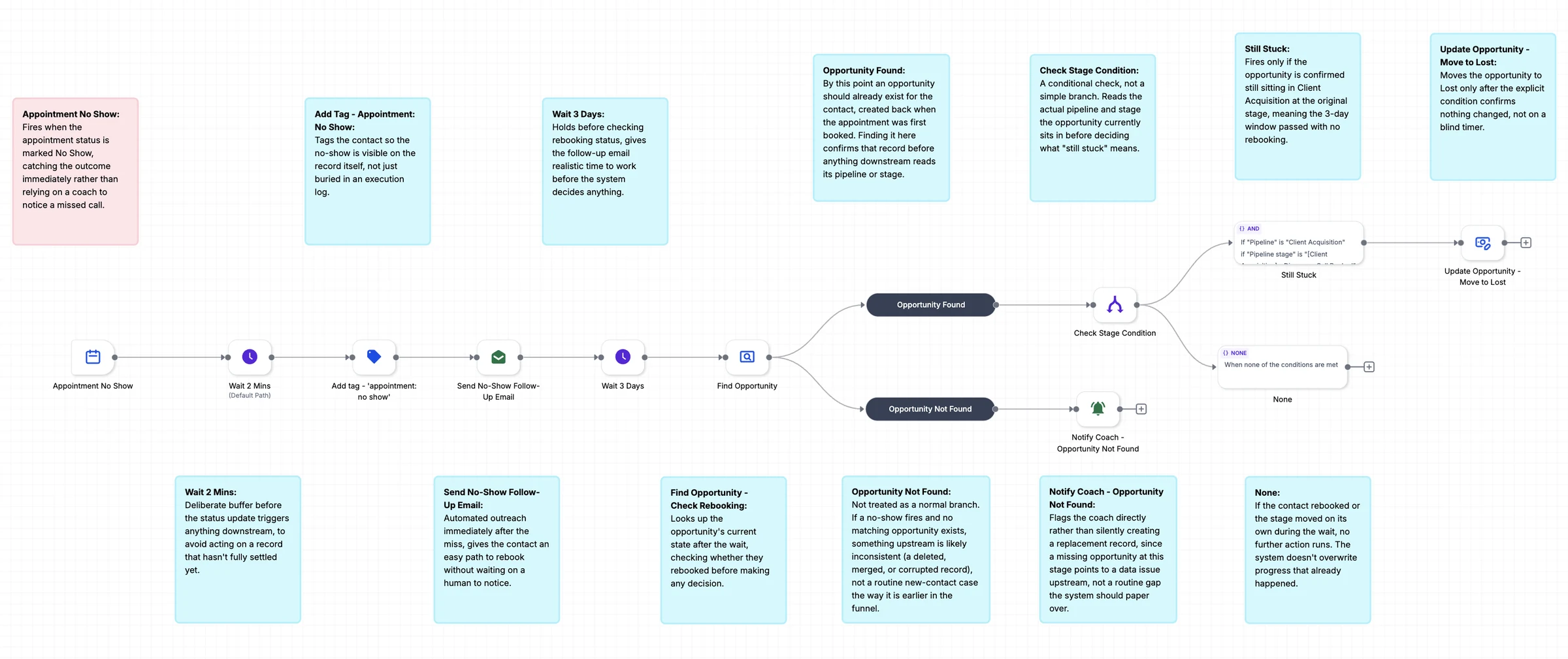
One workflow starts when an appointment is marked No Show. It tags the contact, sends a follow-up email with an easy way to rebook, waits three days, then checks the opportunity. If nothing changed, it moves to Lost. A missing record alerts the coach.
What it changes
You stop chasing missed calls by hand. The follow-up goes out right away, rebooking is easy, and the pipeline cleans itself. Leads who never return move to Lost without you checking.
How it works, step by step
- Marking the appointment No Show starts the workflow right away.
- The contact is tagged and gets an email with an easy way to rebook.
- After three days, the workflow checks whether the lead rebooked or moved on.
- A lead still at the original stage moves to Lost, and a missing record alerts the coach.