The problem
Every lead who fills in my form looks the same in the CRM. I can’t tell who is ready to buy and who is still exploring, so I treat everyone alike and follow up late or in the wrong order.
The build
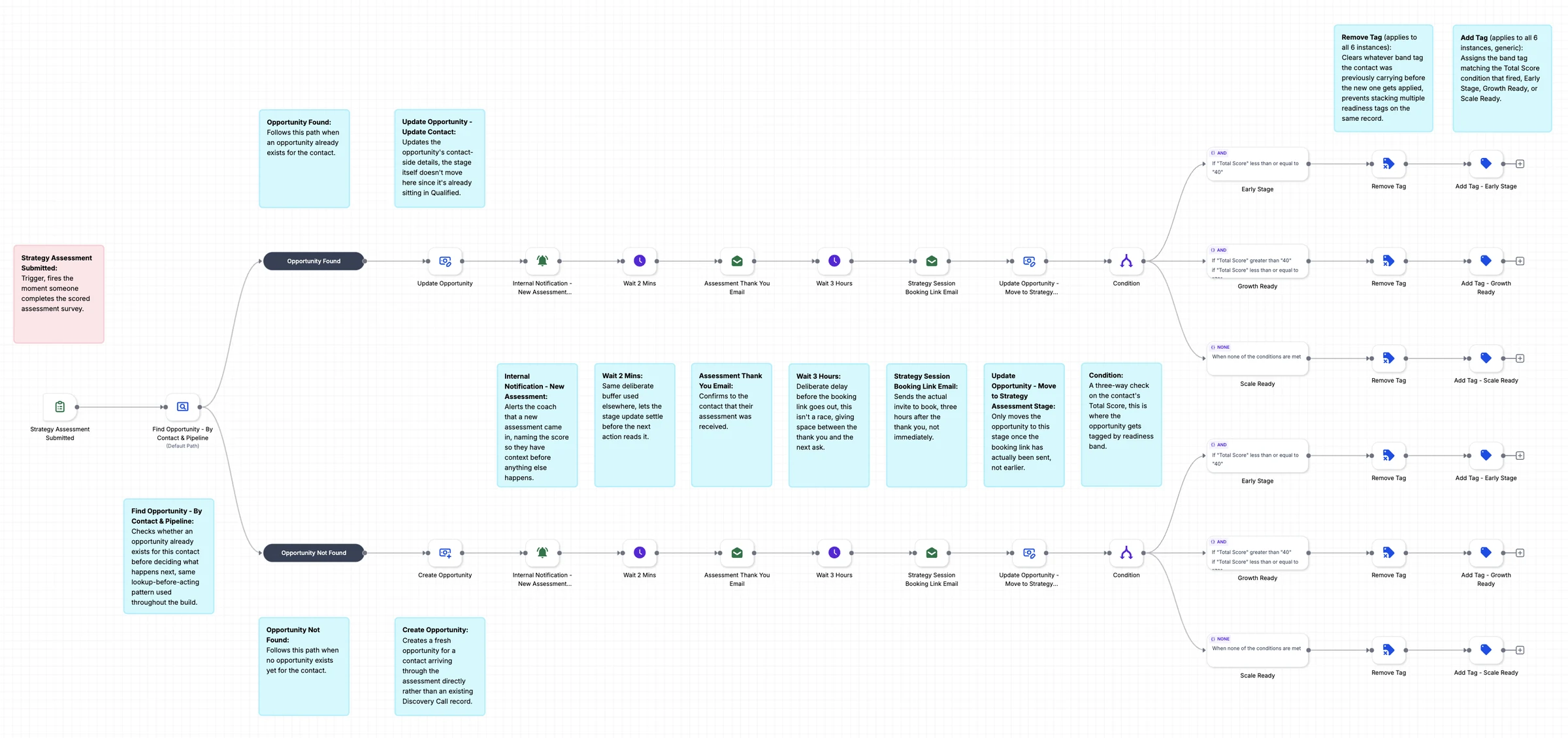
One workflow starts the moment someone submits the scored Strategy Assessment survey. It finds the contact’s opportunity or creates one, alerts the coach, sends a thank-you email, then sends a booking link three hours later. The Total Score sets one readiness band tag.
What it changes
You stop reading each submission to decide who matters. Every lead arrives already scored and tagged, the thank-you and booking emails send without you, and the opportunity sits in the right stage. You open the CRM and see who is ready now.
How it works, step by step
- A completed Strategy Assessment survey starts the workflow.
- The workflow finds the contact’s opportunity, then updates it or creates a new one.
- The coach gets an alert, a thank-you email goes out, and the booking link follows later.
- The Total Score picks one of three readiness bands, and the workflow swaps in that tag.